
Teach the AI your facts
Add your pricing, services and common answers to AI facts, so AI replies get your business right.
Updated 6 steps
Before you startAI drafts, Auto-answer and AI facts are part of the AI Response Assistant, included on Premium.
Steps
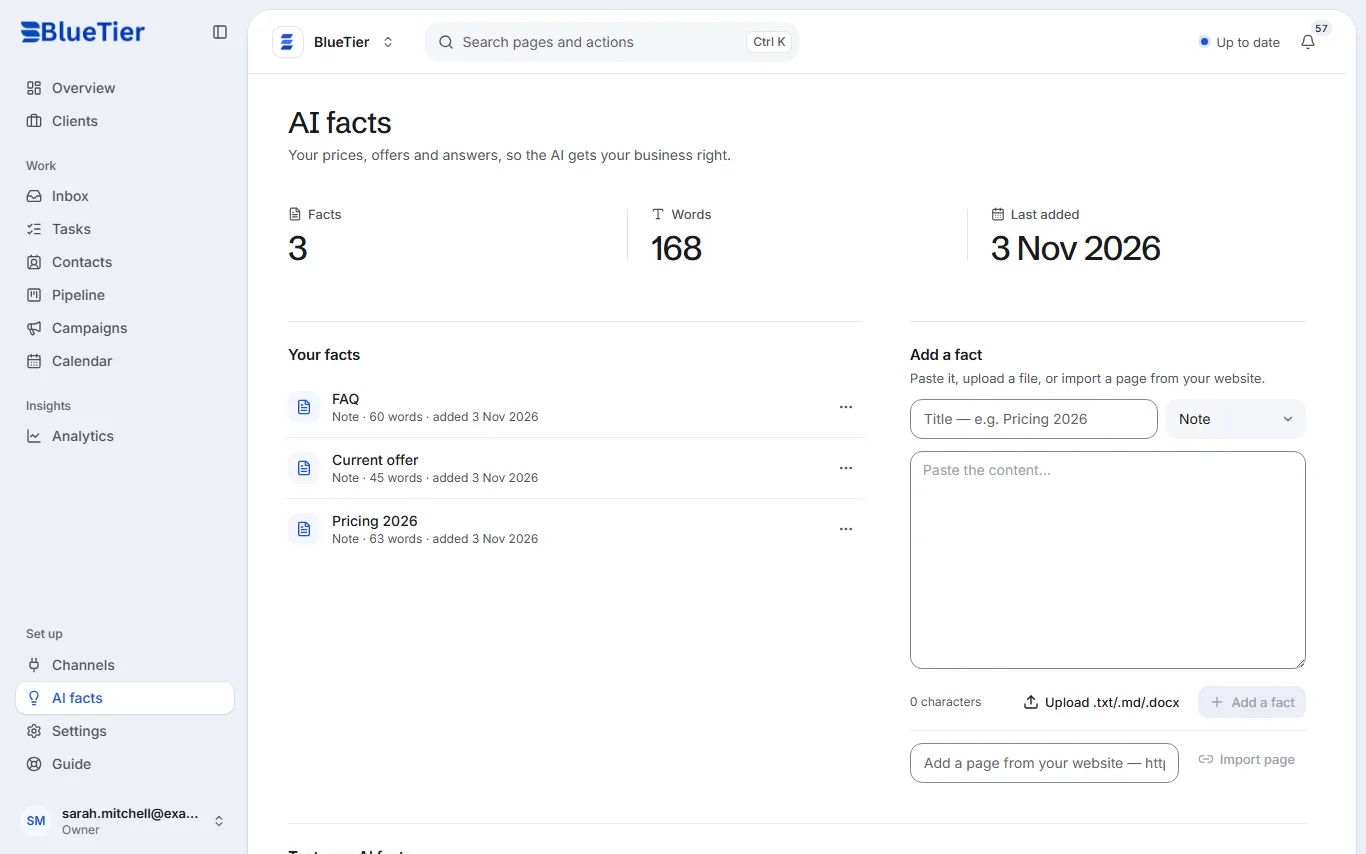
- Open AI facts in the sidebar.
- Under Add a fact, type a title, for example "Pricing 2026".
- Paste the text into the large box and choose Add a fact.
- Or choose Upload .txt/.md/.docx to add a file.
- Or paste the address of a page on your website and choose Import page.
- Repeat for each topic you want the AI to know: prices, services, frequently asked questions.
What you will see
The fact appears under Your facts, and the counts at the top show how many facts the AI can now draw on and when you last added one.
Good to know
- When a conversation needs an answer, the AI uses the facts most relevant to it.
- To remove a fact, open the ⋯ menu beside it and choose Delete fact.
Related articles
Still stuck?Contact support at info@bluetier.ai and the BlueTier team will help.