
Get started with BlueTier
The three things that make BlueTier useful on day one: connect an account, write your business brief and start your first campaign.
Updated 6 steps
Steps
- Go to bluetier.ai, choose Sign in and sign in with your work email and password.
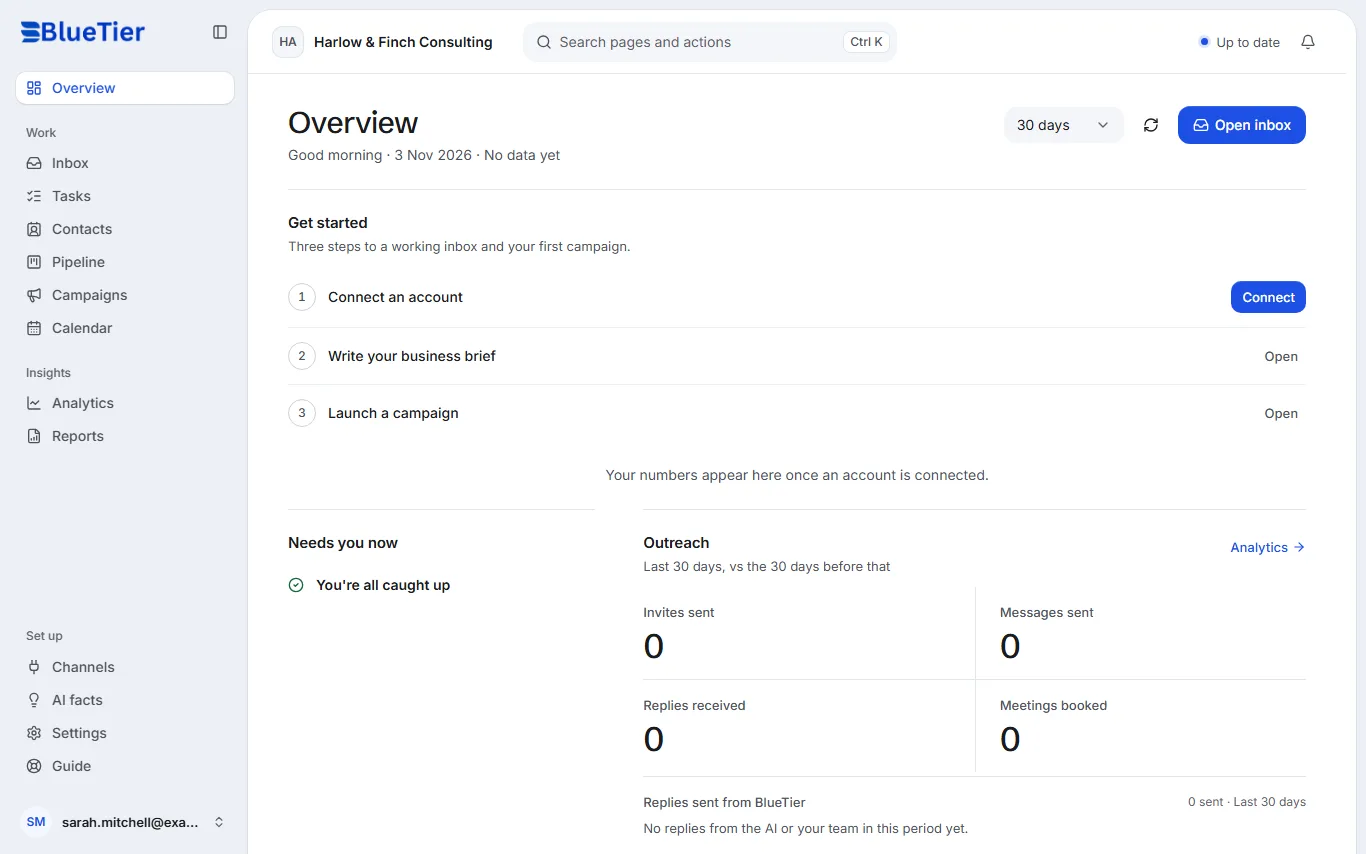
- On Overview, a new workspace shows Get started: three steps to a working inbox and your first campaign.
- Next to Connect an account, choose Connect and pick the channel you use most: LinkedIn, WhatsApp, Instagram, Telegram and email.
- Next to Write your business brief, choose Open and describe your business. The AI only answers from what you write there.
- Next to Launch a campaign, choose Open to set up your first LinkedIn campaign. Nothing is sent until you start it.
- Open Inbox whenever you want to answer people: the conversations from every account you connect are in one list.
What you will see
Once an account is connected, its conversations arrive in your inbox and your numbers start to fill the Overview. Until then, Overview tells you your numbers will appear once an account is connected.
Good to know
- Basic includes up to two connected accounts, Professional up to four and Premium up to eight, on any channel.
- Stuck at any point? Every page of this help center is one task, and the search at the top finds it.
Related articles
Still stuck?Contact support at info@bluetier.ai and the BlueTier team will help.