
Find your way around the app
Where everything lives in BlueTier, and the quickest way to jump to any page.
Updated 6 steps
Steps
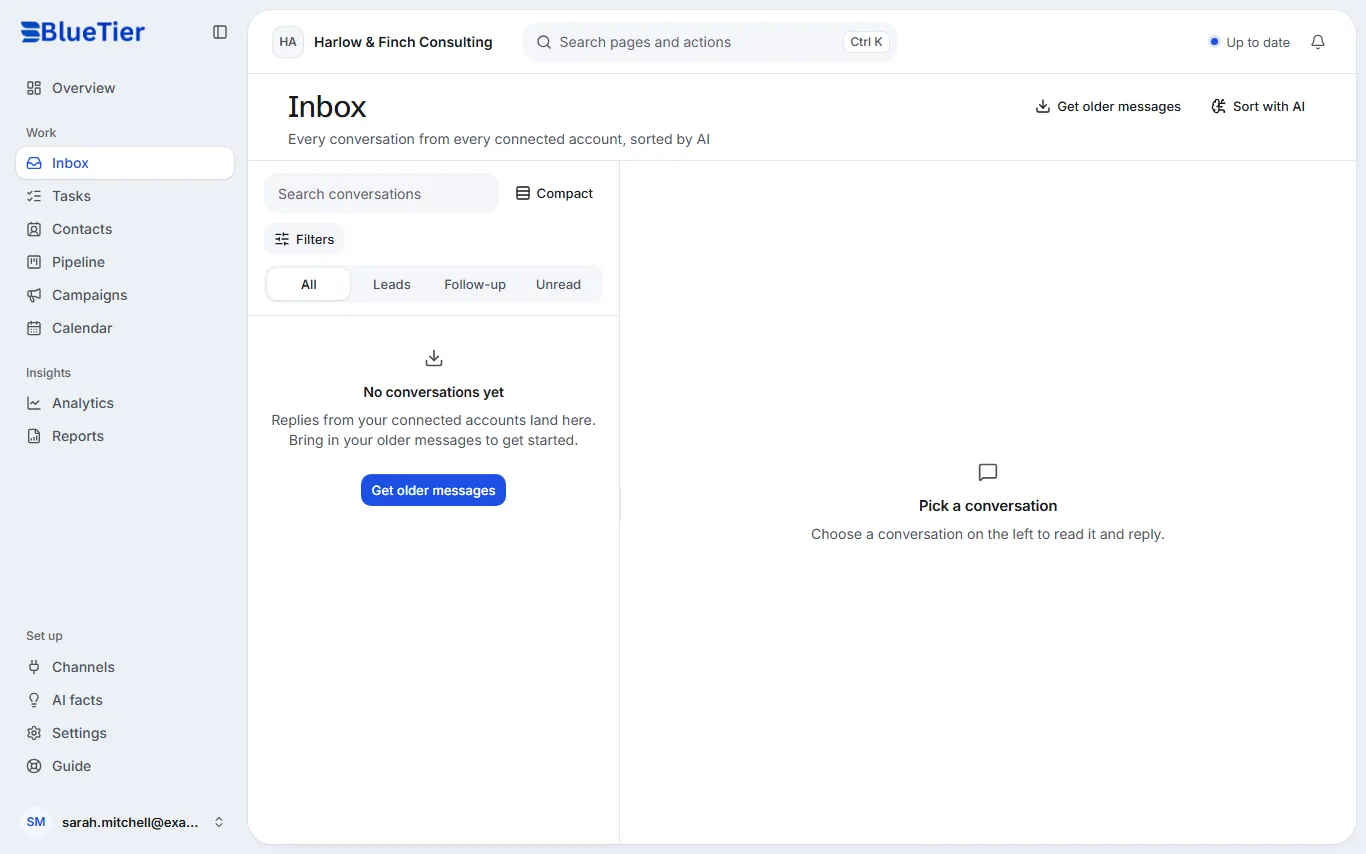
- The sidebar on the left holds every page. Overview is your day at a glance.
- Under Work: Inbox to answer people, Tasks for your follow-ups, Contacts for your CRM, Pipeline for your deals, Campaigns for outreach, and Calendar for meetings.
- Under Insights: Analytics for trends over time, and Reports for weekly totals and CSV exports.
- Under Set up: Channels for your connected accounts, AI facts for what the AI knows, and Settings for AI, team, billing and security.
- Press Ctrl K (or Cmd K on a Mac), or choose Search pages and actions at the top, then type what you want, for example "billing".
- The bell at the top right holds your notifications.
What you will see
The page you pick opens and its name is highlighted in the sidebar, so you always know where you are.
Good to know
- On a phone, the main pages sit in a bar at the bottom of the screen; More opens the rest.
Related articles
Still stuck?Contact support at info@bluetier.ai and the BlueTier team will help.