
Give a client access to their dashboard
Let a client sign in to their own workspace and see their own conversations, campaigns and numbers.
Updated 5 stepsFor agency teams
Before you startFor BlueTier's own team, in the agency workspace.
Steps
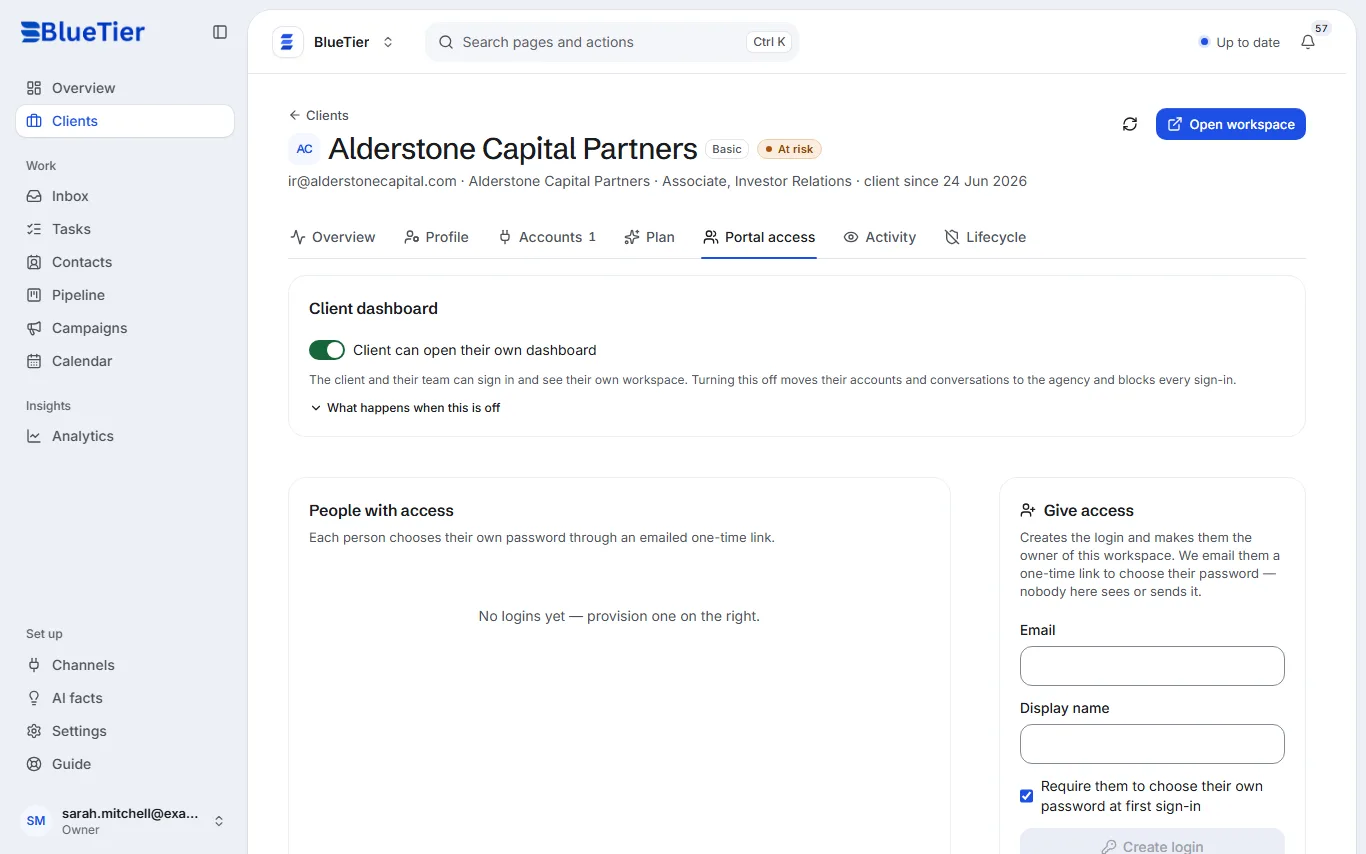
- Open Clients and choose the client.
- Open the Portal access tab.
- Check that Client can open their own dashboard is switched on.
- Under Give access, enter their Email and Display name.
- Leave Require them to choose their own password at first sign-in ticked, and choose Create login.
What you will see
They get an email with a one-time link to choose their password, and appear under People with access. Nobody at BlueTier sees or sends their password.
Good to know
- The login you create makes that person the owner of the workspace. They can then invite their own team from Settings, Team.
- Switching Client can open their own dashboard off moves their accounts and conversations to the agency and blocks every sign-in for that client.
Related articles
Still stuck?Contact support at info@bluetier.ai and the BlueTier team will help.