
Write your business brief
Tell the AI what your business does, who you serve and what it must never say. It answers only from this.
Updated 5 steps
Before you startAI drafts, Auto-answer and AI facts are part of the AI Response Assistant, included on Premium.
Steps
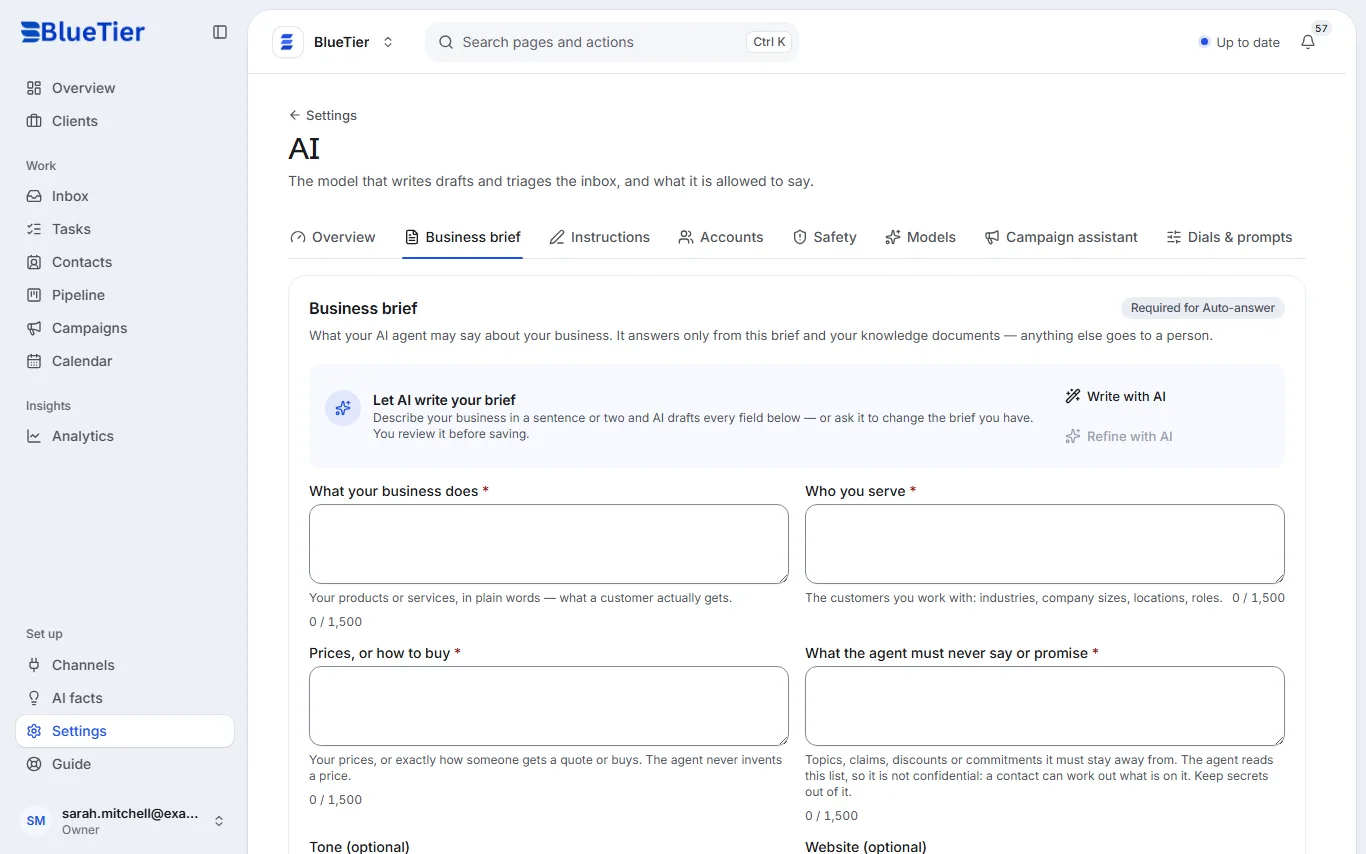
- Open Settings, then AI, then the Business brief tab.
- Fill in the four required parts: What your business does, Who you serve, Prices, or how to buy and What the agent must never say or promise.
- If you like, add a Tone, the one Website link the agent may share, and Anything else.
- Short on time? Choose Write with AI, describe your business in a sentence or two, and check what it fills in.
- Choose Save brief.
What you will see
On the Overview tab of AI, the business brief step is marked done, and Auto-answer can now be switched on.
Good to know
- The agent answers only from this brief and your knowledge documents. Anything else goes to a person.
- The agent never invents a price: it uses only what you write under Prices, or how to buy.
- A contact could work out what is on your never-say list, so keep secrets out of it.
Related articles
Still stuck?Contact support at info@bluetier.ai and the BlueTier team will help.