
Choose a plan, pay or cancel
Start your membership, change plan, update your card, download invoices or cancel.
Updated 5 steps
Before you startOnly the workspace owner or an admin can change billing.
Steps
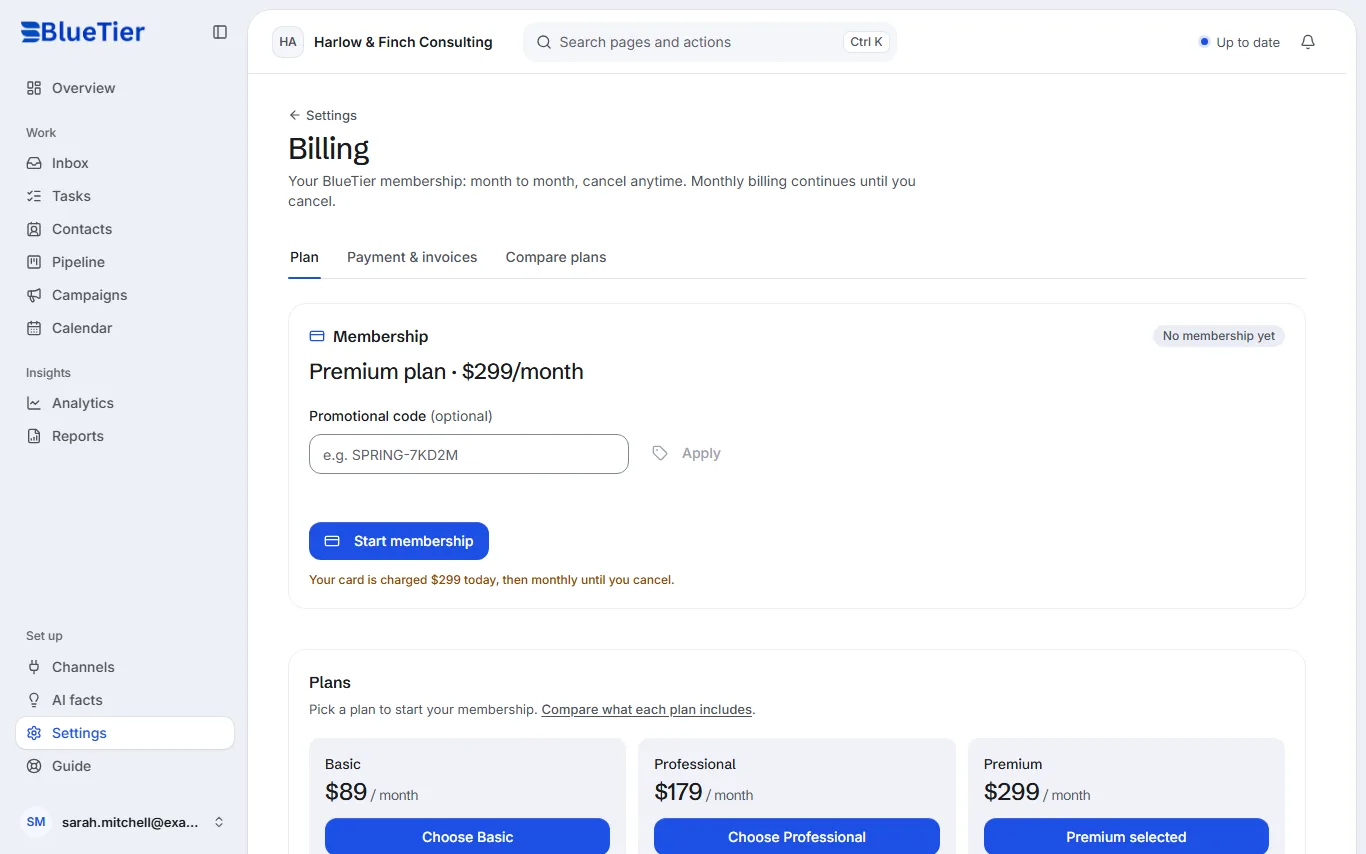
- Open Settings, then Billing.
- On the Plan tab, pick Basic, Professional or Premium. Compare plans shows what each one includes.
- Have a promotional code? Enter it under Promotional code and choose Apply before you pay.
- Choose Start membership and add your card on Stripe's secure page.
- To update your card, download invoices or cancel, open Payment & invoices and choose Manage billing.
What you will see
Your plan shows as Current plan, and your card is charged once a month until you cancel.
Good to know
- Basic is $89 a month, Professional $179 a month and Premium $299 a month.
- Basic includes up to two connected accounts, Professional up to four and Premium up to eight, on any channel.
- Basic runs one campaign at a time, Professional up to 3 at once and Premium as many as you need.
- AI drafts, Auto-answer and AI facts are part of the AI Response Assistant, included on Premium.
- There is no free trial: membership is billed monthly from sign-up. When you cancel, it ends at the close of the period you paid for, and you keep access until then.
Related articles
Still stuck?Contact support at info@bluetier.ai and the BlueTier team will help.